GlassGuard: Verified Glass Plane Mapping for Robot Navigation

▾

💡Problem & Contributions

🚫 Problem
  • Glass creates two mapping failures: missed panes leave dangerous gaps, while misplaced reconstructed planes create phantom walls that block valid paths. Reliable navigation needs both glass coverage and clean free space.
✅ Contributions
  • Geometry verifies placement. GlassGuard constructs metric plane hypotheses from structural LiDAR cues, then cross-checks their orientation using depth-free image geometry and bounds their extent using the glass silhouette.
  • The map remains revisable. Multi-view reprojection and floor-consistency checks refine or remove hypotheses contradicted by later observations, keeping the planner’s glass map up to date.
  • Building-scale evaluation. Across nine scenes in six environments and 2.1 km of autonomous travel, GlassGuard achieves 82% total coverage versus at most 61% for the baselines under identical pinhole inputs, with 5–17× fewer concurrent false voxels per frame. The 360° variant reaches 85% total coverage and detects 47.6% of eligible glass voxels while still at least 10 m away.

⚙️Method

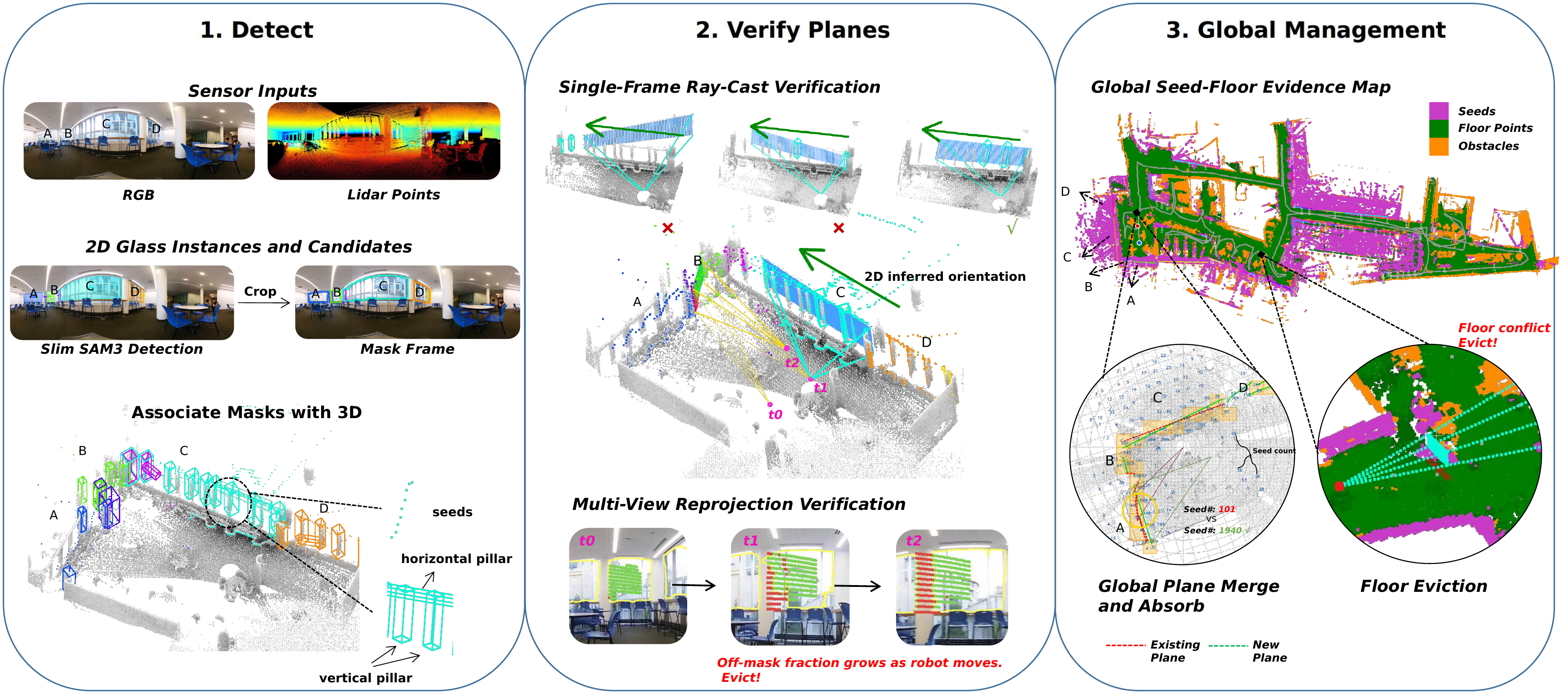
Candidate glass is segmented in RGB; sparse LiDAR structure around the mask anchors a metric plane hypothesis; depth-free projective geometry verifies it before acceptance; the global map keeps every accepted plane revocable, and the planner consumes verified occupancy only.

pipeline overview

🎬Explanation Video

Narrated walkthrough of the method and results.


🤖Real-World Runs

Sample recordings of the full system running live on the robot — spanning indoor and outdoor environments, day and night, buildings of different scale, and glass styles from office partitions to multi-storey atrium facades. GG-360 uses the full panorama; GG-pin is restricted to a single pinhole view + sparse LiDAR — the same inputs the baselines consume.

Building A, Floor 5

Glass-walled offices and long corridors.
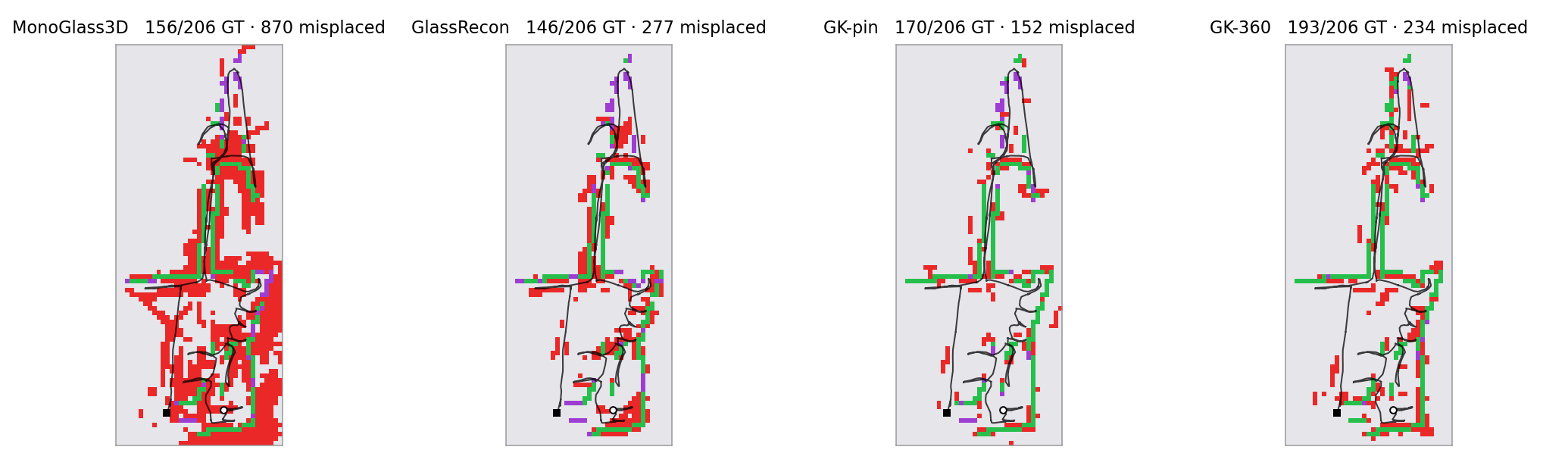
GG-360
GG-pin
top-down occupancy comparison
Top-down occupancy vs. ground truth
detectedmissedmisplacedrobot path

Building A, Floor 4

Dense interior glass; the scene with the most annotated panes (60).
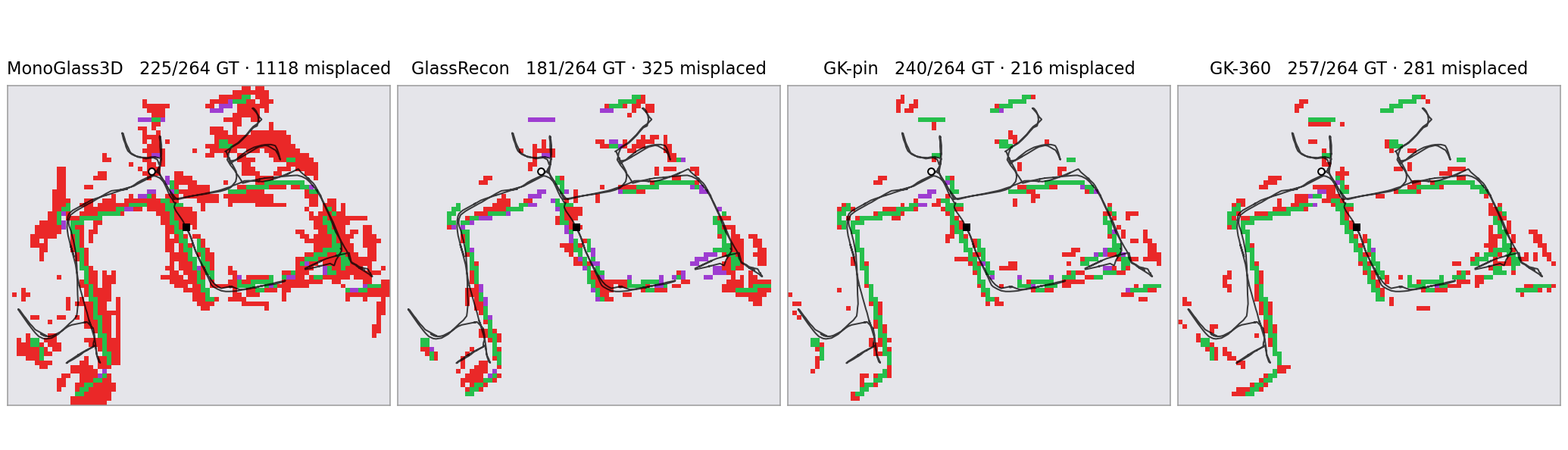
GG-360
GG-pin
top-down occupancy comparison
Top-down occupancy vs. ground truth
detectedmissedmisplacedrobot path

Building B, Atrium long-range

Multi-storey glass atrium; extended 20 m sensing range.
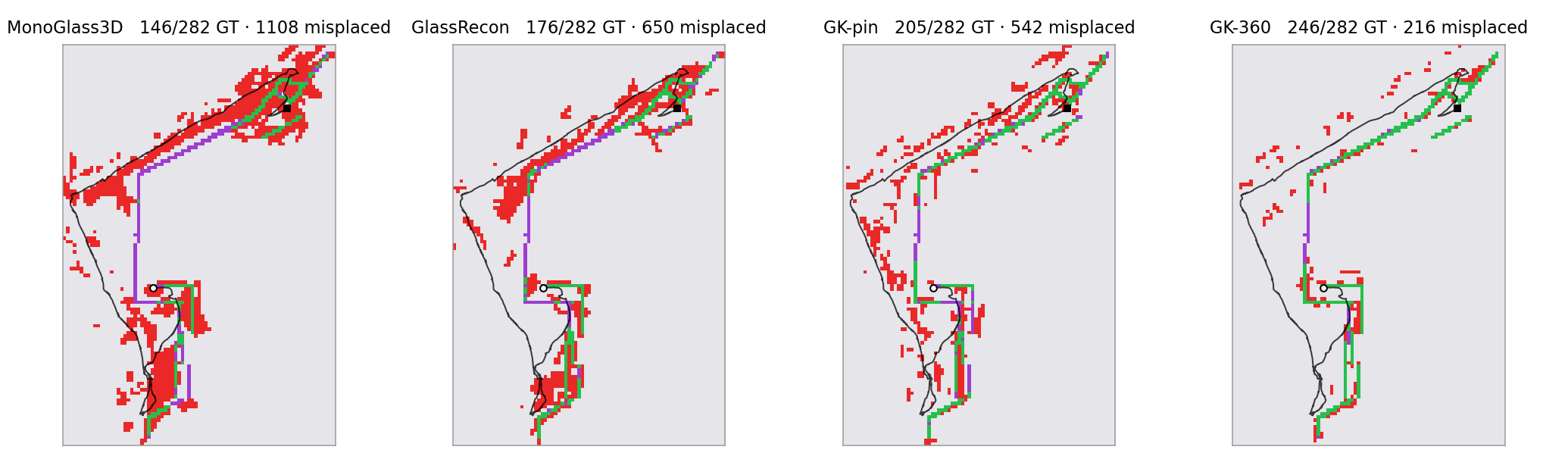
GG-360
GG-pin
top-down occupancy comparison
Top-down occupancy vs. ground truth
detectedmissedmisplacedrobot path

Building B, Interior

Interior glass partitions and meeting rooms.
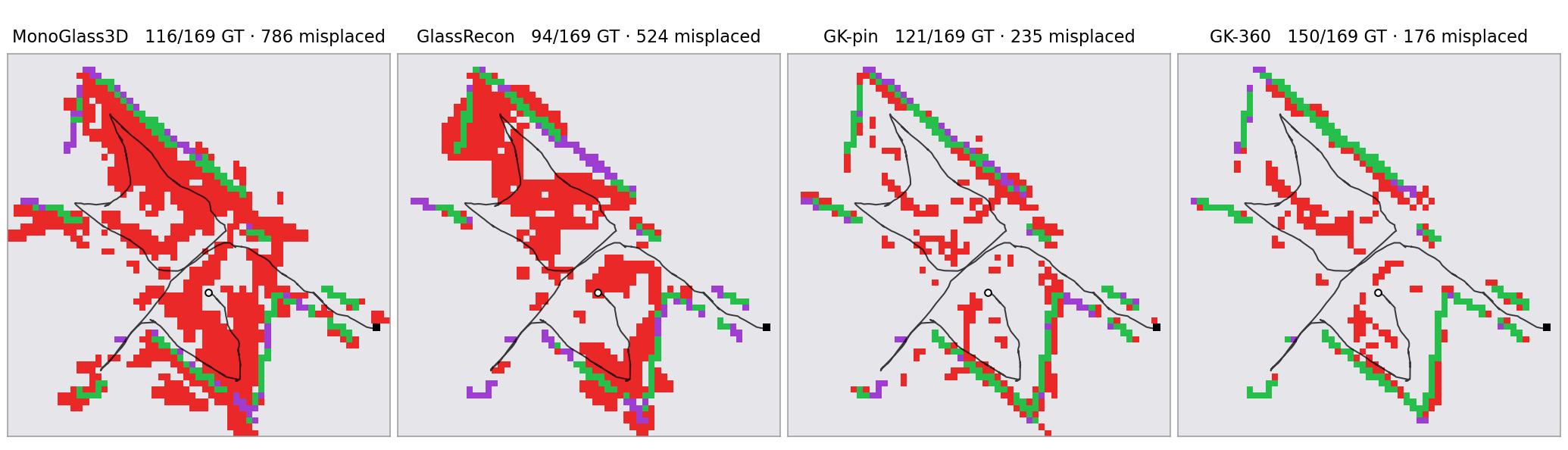
GG-360
GG-pin
top-down occupancy comparison
Top-down occupancy vs. ground truth
detectedmissedmisplacedrobot path

Building B, Floor 2

Glass balustrades and office fronts.
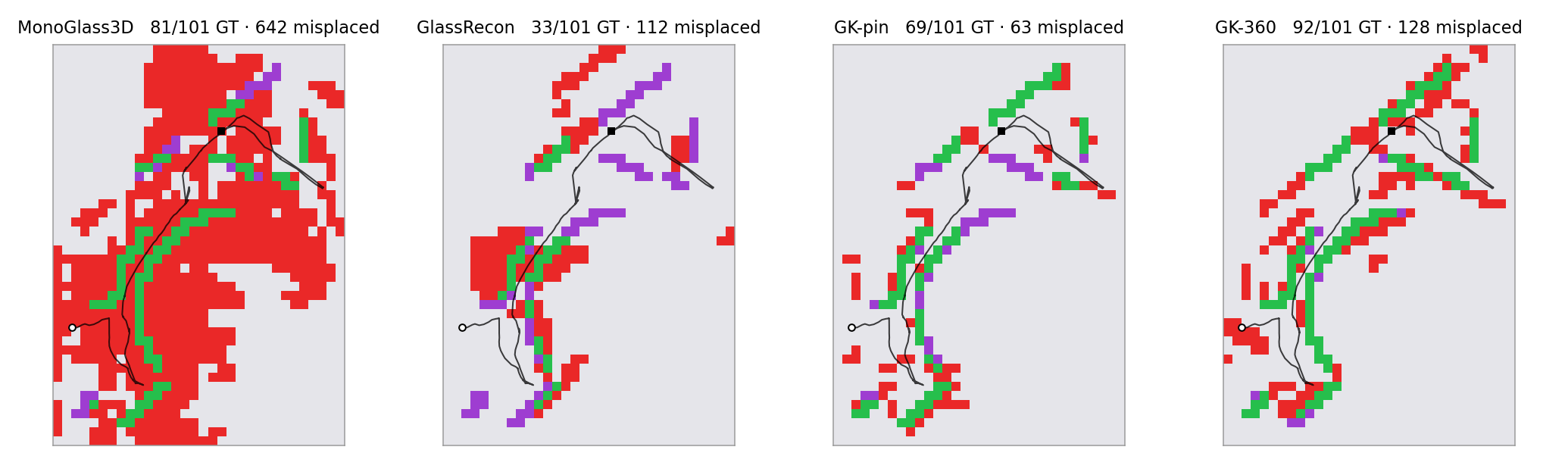
GG-360
GG-pin
top-down occupancy comparison
Top-down occupancy vs. ground truth
detectedmissedmisplacedrobot path

Building C, Office

Cluttered workspace with glass-walled meeting rooms.
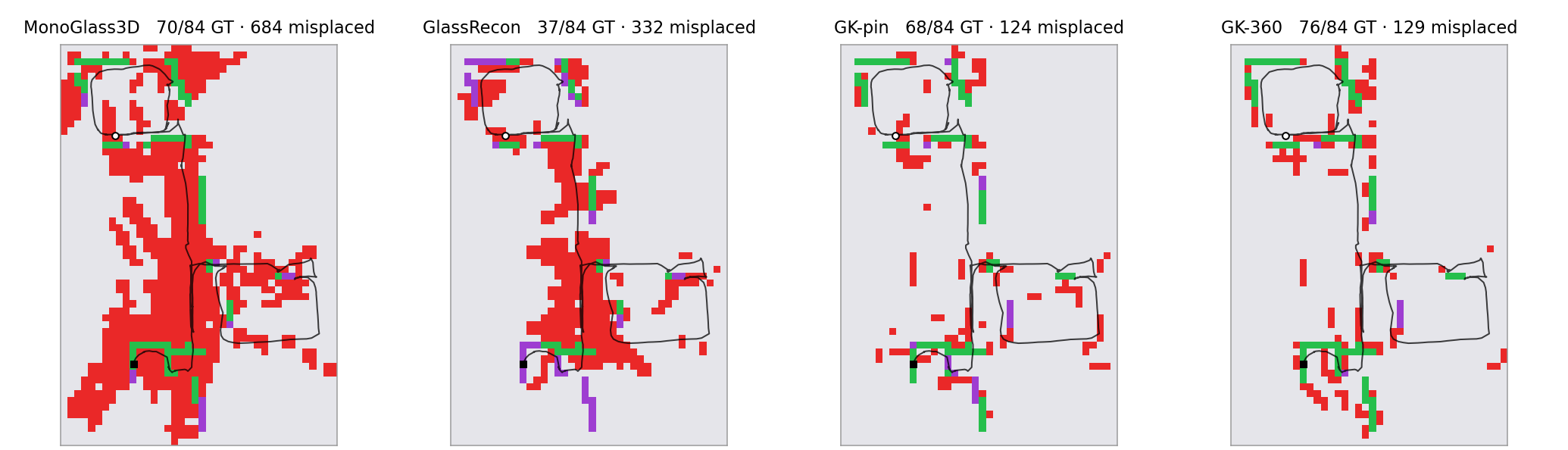
GG-360
GG-pin
top-down occupancy comparison
Top-down occupancy vs. ground truth
detectedmissedmisplacedrobot path

Building A, Exterior — Night low light

Outdoor facade glass at night: hardest visual conditions in the benchmark.
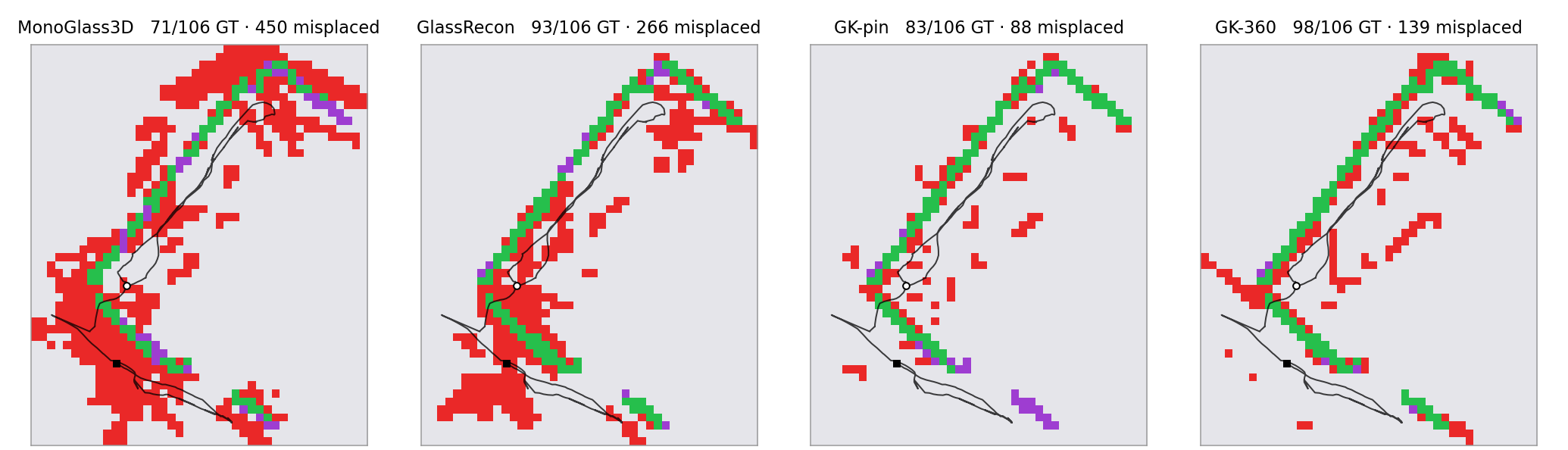
GG-360
GG-pin
top-down occupancy comparison
Top-down occupancy vs. ground truth
detectedmissedmisplacedrobot path
⚖️Baseline Comparison

The reconstruction baselines running live on the same robot and inputs (single pinhole view + sparse LiDAR), shown on Building A, Floor 5 and Building B, Atrium.

Building A, Floor 5

MonoGlass3D — learned monocular baseline
GlassRecon — depth-prior reconstruction baseline

Building B, Atrium largest spill contrast

MonoGlass3D
GlassRecon

📖User Manual

Quick reference for running GlassGuard: segmentation-backbone footprint and the handful of parameters that actually matter.

Speed & VRAM by segmentation body

SAM bodyResident VRAMMask quality (vs. teacher)Note
Slim-2816 · BF161674 MB0.966 mAP@50default — evaluated configuration
Slim-2816 · INT81390 MB0.965 mAP@50near-lossless, smaller GPUs
Slim-2816 · INT41190 MB0.958 mAP@50tightest footprint
Slim-1752<1.4 GB0.717 IoU (vs. 0.748)faster, small recall loss

Full system: ~1.5 GB VRAM, ~0.74 s per frame end-to-end (detection + verification + global map) on the robot GPU; the 2-process pipeline mode overlaps mapping with perception for higher throughput.

The hyperparameters that matter

KnobDefaultWhat it does / when to touch it
RANGE_M10One knob for sensing range: LiDAR crop, plane placement and spill radii, plane-fit ceiling. Raise (15–20) for atriums and outdoor facades.
CONF_TH0.3Segmentation confidence. Lower finds fainter glass but leans harder on the geometric verification to reject the extras.
--pinhole-dir-trust-min-span-px140Angle-gate arming: minimum edge span before the projective orientation check is trusted. Higher = gate arms less often (falls back to the conservative dv/dh test).
spill_hard_frac0.55Off-mask fraction of a reprojected plane that evicts it immediately; smaller rises above the plane’s own tolerance are counted over several views. Lower = more aggressive self-correction.
min_cov0.10Minimum LiDAR seed coverage to place a plane at all — the floor on how little structural evidence is acceptable.
GROUNDING_CELL6 pxContact-seed grid resolution around the mask. Finer = tighter pane footprints, slightly more compute.
PIPELINEtrue2-process split: background mapping + foreground perception (the evaluated configuration). Set false for a simpler single-process run.
provider voxelSize0.05 mLiDAR stack voxel. 0.02 sharpens contacts but ~6× the CPU on large outdoor stacks.

Everything else ships frozen at the evaluated configuration — see TUNABLES.md in the code release.